The Complete Guide to the Travel Keeper App
June 24, 2026
If you’re the parent who plans the trips. You know, the one with the spreadsheet, the confirmation emails buried in your inbox, and a mental list of which hotel rooms actually fit a family of five…then this guide is for you. Travel Keeper is built to hold your whole trip in one place, keep your family’s details organized, and help you stretch your travel budget further. No ads, no tracking, and you’re always in control of your data.
This guide walks through everything the app can do, organized the way you actually travel: planning the trip, keeping the family’s details handy, tracking the money, and sharing it safely. Most of it is free forever, but a few power features are Pro, and we’ll flag those clearly with a ⭐.
Start Here: Your First Trip in Travel Keeper
You don’t need to learn the whole app to get value on day one. Here’s the fastest path from “we’re thinking about a trip” to “it’s all organized.”
- Create a trip. Give it a name and dates. Trips are unlimited and organized day by day, so a two-week multi-city summer trip is just as easy to manage as a long weekend.
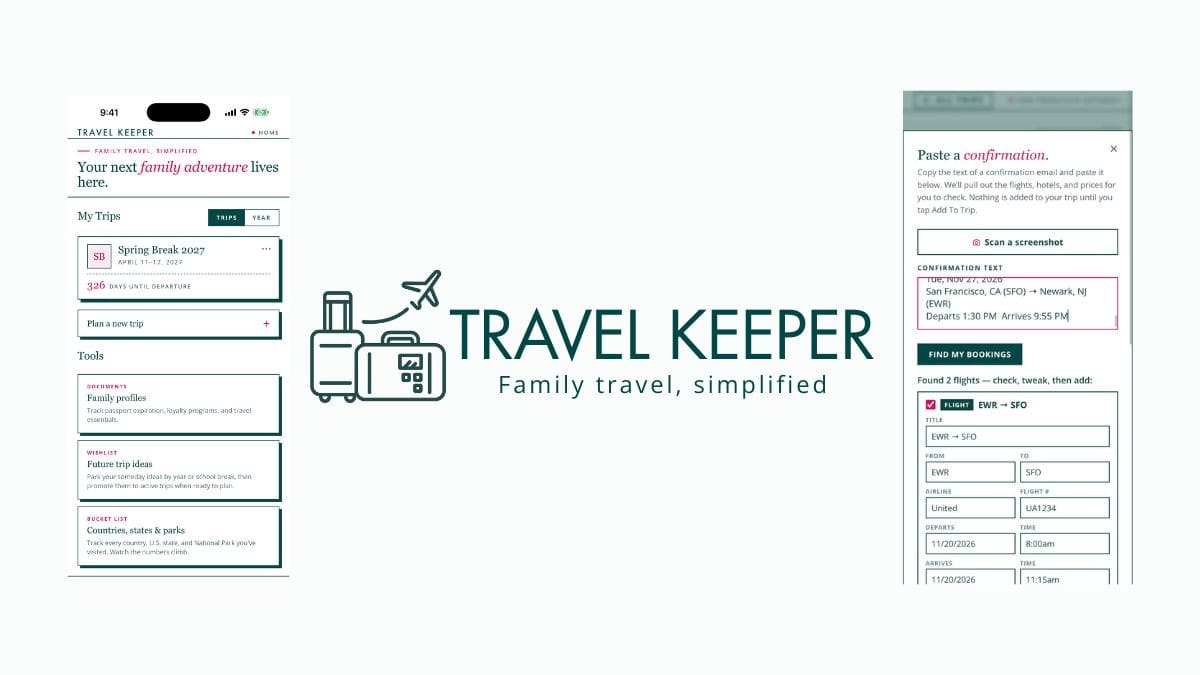
- Add your first booking. Flight, hotel, an activity or whatever you’ve booked first. (On Pro, you can paste a confirmation or snap a screenshot and let the app fill it in for you. More on that later.)
- Drop in a packing list. Start from a ready-made template so you’re not staring at a blank screen.
- Add the travelers. Everyone who’s coming. This is what makes the family details (passport expirations and loyalty numbers) pay off later.
That’s it. Everything else in this guide builds on those four steps.
Want to compare Travel Keeper to others like Wanderlog and TripIt? See my full comparison post here.
Part 1: Plan the Trip
This is the heart of the app. You’ll turn a pile of screenshots and ideas into a clear, day-by-day plan you can follow before, during, and after your trip.
Build your itinerary, day by day
Every trip is organized as a series of days, and you add what’s happening on each one. Add flights, hotels and stays, activities and tours, transport and car rentals, food, and notes. Instead of flipping between five confirmation emails and a maps app, you open one day and see exactly what’s happening, in order.
Every entry is fully editable, and you can move an entry between trips if your plans shift, so the hotel you logged under the wrong trip is one tap from where it belongs.
Also, because trips are unlimited, you can keep a trip for every idea, from the spring break trip you’ve booked, the fall trip you’re still researching, and the someday trip you’re dreaming about. They all live in your Travel Keeper app side by side.
Flights that handle real life
Family flights are rarely simple. Travel Keeper’s flight details are built for the messy reality:
- Multi-leg and layover flights: capture every segment of a connecting itinerary, not just the first hop.
- Departure and arrival times, including next-day arrivals handled correctly so an overnight flight doesn’t scramble your schedule.
- Multiple passengers on a single flight, so the whole family’s reservation lives together.
- Confirmation numbers so when you’re standing at the airport you’re not digging through email.
- Reverse a flight’s direction in one tap: so a round-trip you entered backwards is fixed instantly instead of re-typed.
Hotels, stays, activities, meals, and transport
Anything that makes up your trip gets its own booking with the details that matter (add all your dates, times, costs, confirmation numbers). A “stay” can be a hotel, a rental, or grandma’s house. Activities and meals let you build out the parts of the day that aren’t just logistics, which is especially handy when you’re traveling with kids who want to know “what are we doing today?”
Notes, everywhere you need them
You can add notes at three levels: per trip (the rental car company’s after-hours number), per day (nap-time plan, dinner reservation under which name), and per booking (room confirmed with a rollaway bed). The detail you scribble while booking is right there when you need it three months later.
Stay on track with the planning timeline
Planning a big trip is a sequence, not a single event, and it’s easy to forget a step. Travel Keeper includes a 13-step planning timeline. This is a built-in booking and planning checklist that tracks your progress and is smart-dated to each specific trip. It knows your trip’s dates, so it can nudge you on the right things at the right time instead of giving you a generic to-do list.
⭐ On Pro you can add your own custom timeline steps and reminders alongside the built-in ones. This is perfect if your family has its own rituals (renew the kids’ passports, book the dog sitter, check in to your cruise, confirm the grandparents’ flights).
Trip reminders so nothing slips
Opt-in to on-device local notifications that are timed to each trip’s milestones and arrive at 9am local time, so the app can remind you about the things that matter before they become a problem. They run on your phone. No account is required, but the Pro tier allows you to add your own custom timeline reminders.
Packing lists you don’t have to build from scratch
Every parent knows the dread of packing for the whole family. Travel Keeper gives you six built-in packing lists (carry-on, beach, cold weather, international, baby and toddler, and road trip) you can drop into any trip and then customize. Per-item count steppers mean you can set “5 shirts” instead of checking the same box over and over. Check things off as they go in the bag.
⭐ On Pro you can save any trip’s packing list as a reusable custom packing template, so the list you perfected for last summer’s beach week becomes your starting point every year.
See it on a calendar
⭐ Pro adds a calendar view that lays your whole trip out on a real month calendar instead of a list. For longer or multi-city trips, this is the “oh, that’s how the two weeks fit together” view. This is great for spotting a gap, an overlap, or a too-tight connection.
Part 2: Keep the Family’s Details Handy
The bigger the family, the more details there are to manage…and the more painful it is when one of them is missing at the worst possible moment. Travel Keeper keeps your family’s travel identity in one secure place, stored on your phone. Family profiles are never synced or shared unless you specifically choose to.
Traveler profiles
Set up a profile for everyone in the family, then assign travelers to each trip and each booking. The app always knows who’s on this flight, who’s in that room, and who’s coming on which trip.
Passport profiles
Store each person’s passport expiration, so you can see at a glance whether anyone’s passport is getting close to expiring, the kind of thing that’s easy to miss until it’s a crisis at renewal time.
Loyalty profiles
Keep everyone’s frequent-flyer and hotel program numbers, plus their points balances, in one place. No more hunting for a kid’s airline number every time you book, and no more missing out on miles because the number wasn’t handy. (This is also where the “aspiring optimizer” in you starts to win because every booking credited is progress toward the next big trip.)
Wishlist
Keep a running list of the places you want to take the family. The wishlist is where “we should go there someday” stops evaporating and starts becoming the next trip you plan.
Part 3: Track the Money (and the Points/Miles)
Big family trips are a big spend, and seeing the numbers clearly is what makes them feel possible, and repeatable. This is also where Travel Keeper quietly turns regular parents into smart travelers.
Cost tracking, in cash and points
Log what each booking cost in cash, points, or free-night certificates. This matters because modern family travel is rarely all one or the other. You might pay cash for flights, burn points on hotels, and use a free-night certificate for one luxury night. Travel Keeper holds all three in the same view so you actually understand what the trip cost you.
Multi-currency totals
If you are traveling abroad, log costs in whatever currency you paid, and Travel Keeper shows your whole trip’s spend converted to your home currency. No mental math, no spreadsheet formulas, just the real number.
The trip savings card
This is the fun one. Travel Keeper generates a shareable image of your trip’s cost, savings, and points. It’s the card that makes your friends ask “wait, how did you do that for that price?”, and it’s why your savings-minded posts travel so well. It’s proof, in one tap, that a big family trip didn’t mean a reckless budget.
⭐ Want the deeper breakdown? Pro shows you where the money went. See your trip’s spend split by category (flights, lodging, food, and more), so you can see what’s actually driving the cost and where points are saving you the most.
⭐ And once a year, Pro builds your Year in Travel. This is a shareable recap card of your trips, days away, total savings, and points earned. It’s a highlight reel of your family’s year, and it’s the kind of thing people love to share.
A note for the aspiring optimizer: you don’t have to be a “points person” to benefit here. Most families start by logging what they spent, notice how much a few points redemptions saved, and let that pull them gently toward bigger trips. The app meets you wherever you are on that curve.
Part 4: Share It, Access It, Protect It
A family trip isn’t just yours. Your partner needs the plan, the grandparents want to follow along, and your data needs to stay yours.
Shareable trip links
Two ways to share, depending on what you need. Send a free, private, view-only link to anyone, from your partner to the family group chat. The link is encrypted and automatically leaves out confirmation numbers and travelers’ names, so you share the plan without exposing sensitive details.
Inside your app settings, you can turn any link off anytime, and links expire on their own within a year. Or, with Pro, invite specific people to view or help edit a trip, with a security check and instant removal (see Plan together below).
Open in Maps
Tap any place in your itinerary to open it directly in Maps. Getting from “what’s next” to “how do we get there” is one tap.
Home-screen widget (iOS)
Your next trip, at a glance, right on your home screen. A small thing that delivers a little jolt of “it’s really happening” every time you unlock your phone.
Backup and restore
On iPhone, you can turn on backup to your own private iCloud with a simple in-app toggle, so your trips survive a new phone or a reset. It never comes to Travel Keeper, and you’re always in control.
Privacy by design
This is core to what Travel Keeper is, not a footnote. There are no ads, no tracking, your data is never sold, and auto-backup, sharing with collaborators, and sync are always opt-in only. Travel Keeper doesn’t read your inbox and all your trips stay in your control. Even the screenshot-reading and import features process everything on-device.
In an app category full of apps that plug into your email and monetize your travel data, Travel Keeper’s business model is simple: it doesn’t want to see your trips, and it can’t. When you do turn on sync or sharing, your trips are encrypted on your device first, so only you can read them. For a parent storing the whole family’s passport expirations and plans, that’s not a nice-to-have, it’s the whole point.
Part 5: Travel Keeper Pro Features, One by One
Everything above marked ⭐ is part of Pro. Pro requires an account, but there’s no password to remember. You sign in with a code sent to your email, and that account is what unlocks Pro, keeps your devices in sync, and lets you invite people to plan with you.
Travel Keeper Pro is $39 a year. If you subscribed during the founders window, you keep the special $29 price for as long as your subscription stays active. Everything that’s free today stays free forever. Pro only adds new tools, it never moves an existing free feature behind the paywall.
Here’s the full Travel Keeper Pro lineup in one place, so you can see exactly what you unlock.
1. Plan together/add trip collaborators
Invite your partner or the grandparents by email to view a trip or help edit it, with a quick security check so you always know exactly who’s in. Remove someone and their access ends right away. You can have up to 10 people on a trip. Viewing a shared trip is free for whoever you invite.
Your Pro subscription includes one free “plan-together seat” you can give to one person so they can edit without their own subscription. Anyone else who edits needs their own Pro account.
2. Sync across your devices
Plan on your laptop, pick it up on your phone, always in step. Your trips are encrypted on your device before they leave, so only you can read them, and Travel Keeper never sees them. When you turn it on, you’ll get a 12-word recovery phrase. It’s the only key to your synced trips, so keep it somewhere safe. Even I can’t recover it for you, and that’s the point. Sync is opt-in and off until you turn it on, and turning it off deletes the synced copy.
3. Import bookings instantly
Paste a confirmation or snap a screenshot, and Travel Keeper auto-fills flights, hotels, dates, times, prices, and travelers for you. It pulls every passenger off a family booking, not just the lead traveler, and its smart airline recognition reads carriers even when they’re spelled out by name. It reads everything on-device, so your confirmations never leave your phone.
This is the single biggest time-saver in the app. It turns trip setup from twenty minutes of typing into a few taps. If you only try one Pro feature, try this one.
4. Calendar view and Add to Calendar
See your whole trip on a real month calendar inside the app instead of a list, best for long trips, multi-city routes, and spotting gaps or overlaps at a glance. You can also export a trip straight to your phone or computer calendar (Apple, Google, or Outlook), so the plan shows up next to the rest of your life.
5. Where the money went
Your trip’s spend broken down by category (flights, lodging, food, and more), so you understand what’s driving the cost and where your points are working hardest.
6. Your Year in Travel
A shareable recap card of your year: trips taken, days away, total savings, and points earned. A highlight reel of your family’s travel year.
7. Custom timeline steps
Add your own planning milestones and reminders alongside the built-in 13-step timeline, so the checklist matches the way your family plans.
8. Custom packing templates
Save any trip’s packing list as a reusable template. Perfect the list once; reuse it forever.
9. Export a trip to PDF
Turn your full trip into a brand-styled PDF to keep, print, or share through your phone’s share sheet. Great for handing a clean copy to a travel companion, a babysitter, or the grandparents or just keeping an offline backup of the plan.
Quick-Start Checklists
Your first 10 minutes
- Create your first trip with dates
- Add one booking (flight or hotel)
- Drop in a starter packing list
- Add your travelers
- Skim the 13-step planning timeline
Set up your family once (pays off every trip)
- Create a traveler profile for each family member
- Add everyone’s passport expiration
- Add everyone’s frequent-flyer and hotel numbers
- Start a wishlist of places you want to go
Get the most out of every trip
- ⭐ Add collaborators to your trip. Pro gets 1 free seat to edit trips
- ⭐ Sync automatically between your computer and your phone
- Log every booking’s cost (cash, points, or certificates)
- Share a private, view-only link with your travel companions
- Generate your trip savings card and share it
- ⭐ Use screenshot import to set up trips in seconds
- ⭐ Export the finished trip to PDF as a backup
Travel Keeper is private by design. No ads, no tracking, your data is never sold, and sync, sharing, and backup are always opt-in. Plan the big trips. Keep your family’s details safe. Travel more on what you have.


